Operations Dashboard: CRM, ERP & Project Tools
Stop paying for 6 tools. Use one.
One modular dashboard replaces Basecamp, ClickUp, HubSpot, and Jobber. Configured for your industry on isolated infrastructure.
You're Paying for 6 Tools That Don't Talk to Each Other
What You're Paying For Now
- ✗ ClickUp / Basecamp — $10-25/user/mo for project management
- ✗ HubSpot / Salesforce — $50-300/mo for CRM you barely use
- ✗ Mailchimp / ConvertKit — $30-80/mo for email marketing
- ✗ Calendly / Acuity — $12-25/mo for scheduling
- ✗ QuickBooks / FreshBooks — $30-80/mo for invoicing
- ✗ Jobber / ServiceTitan — $50-200/mo for industry tools
Total: $180-700+/mo — and none of them share data.
What You Get With Doon
- ✓ One dashboard. CRM, projects, scheduling, invoicing, email, AI — all in one place.
- ✓ Everything connected. A lead becomes a client becomes a project becomes an invoice. No copy-pasting between tools.
- ✓ Only what you need. 32 modules available. Toggle on what your industry uses. No feature bloat.
- ✓ Your own isolated stack. Your data lives in your own database. Not shared with other businesses.
- ✓ AI built in. Claude-powered assistant that knows your business, your clients, your data.
- ✓ One bill. Part of your Araptus ecosystem. No per-user pricing. No surprise charges.
What It Replaces
| You're Paying For | Doon Module | What You Get |
|---|---|---|
| ClickUp / Basecamp | Projects | Kanban board, drag-and-drop tasks, comments, assignments, priority levels |
| HubSpot / Salesforce | Clients + Leads | Full sales pipeline, activity tracking, contact management, conversion tracking |
| Mailchimp / ConvertKit | Newsletter | Email campaigns, drip sequences, subscriber management, open/click tracking |
| Calendly / Acuity | Scheduling | Availability slots, client booking, hour tracking, bundle purchases |
| QuickBooks / FreshBooks | Billing + Invoicing | Stripe subscriptions, invoicing, proposals with e-signature, MRR tracking |
| Jobber / ServiceTitan | Industry Modules | Estimates, fleet tracking, service areas, appointments — toggled per industry |
| Intercom / Drift | Chat + AI | Direct client messaging, Claude-powered AI assistant with business context |
See It Running
Explore the full dashboard with fictional data. Navigate pages, view the pipeline, check client details — everything works, nothing saves.
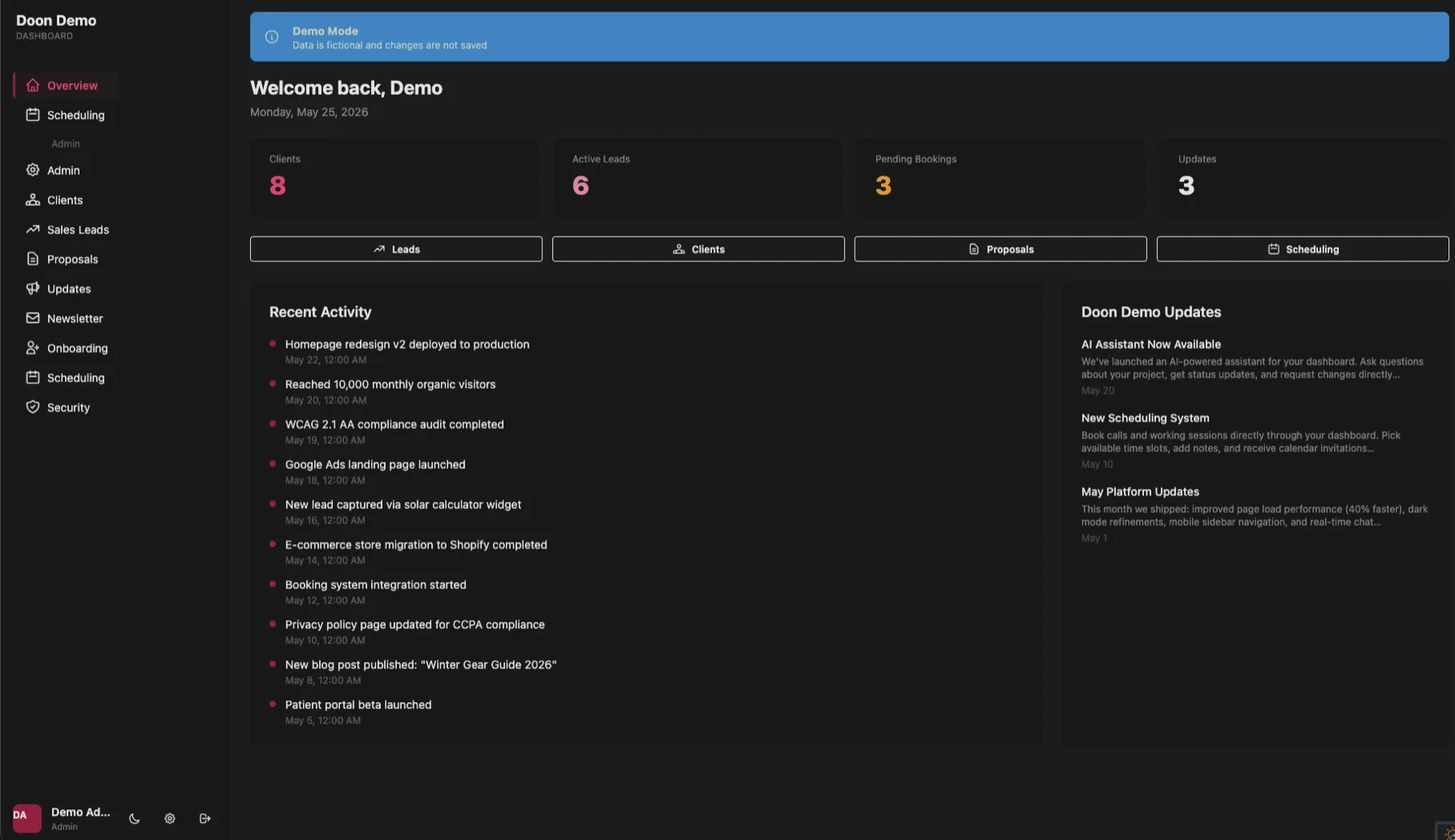
13 Core Modules
Always available. The backbone of your operations.
Clients
Contact management, profiles, hour tracking, billing status, activity history
Leads
Sales pipeline — new through won. Activity tracking, SEO data, outreach
Proposals
Create, send, track. Client signs online. Stripe invoice auto-created
Scheduling
Availability slots, client booking, hour bundles, calendar views
Projects
Kanban board with drag-and-drop. Tasks, comments, priorities, assignments
Newsletter
Email campaigns, drip sequences, subscriber management, open/click tracking
Chat
Direct client-to-admin messaging with real-time updates
AI Assistant
Claude-powered chat that queries your data, clients, and knowledge base
Billing
Stripe subscriptions, invoicing, hour bundle purchases, payment tracking
Accounting
MRR tracking, overhead, P&L, annual projections. MFA-gated
Updates
In-app announcements feed visible to your clients
Referrals
Client referral program with reward tracking and unique links
Security
Honeypot logs, rate limiting, IP blacklist, trusted devices, attack mode
19 Industry Modules
Toggle on what your business needs. Only enabled modules load — zero bloat.
Estimates
Line-item job quoting with approval flow
Home Services
Reviews
Google/Yelp/Facebook review aggregation
Services, Health, Retail
Appointments
Client self-booking with reminders
Health, Services
Tickets
Support ticket system with priority and assignment
Tech, Services
Inventory
Stock levels, reorder alerts, movement tracking
Retail, E-commerce
Invoicing
Standalone invoices with line items and payment tracking
All Services
Donations
Campaign tracking, donor management, receipts
Non-Profit
Events
Event management with registration and ticketing
Non-Profit, Community
Content Calendar
Social content scheduling across platforms
Marketing, Media
Campaigns
Campaign ROI tracking with spend/revenue metrics
Marketing
Compliance
License and certification tracking with expiry alerts
Insurance, Financial
Policies
Policy management with renewal pipeline
Insurance
Listings
Property and service listing management
Real Estate
Directory
Member and business directory
Community
Fleet
Vehicle and equipment tracking with maintenance logs
Home Services
Service Areas
ZIP code and radius-based coverage management
Home Services
Booking Calendar
Public booking system with payment integration
Travel, Health
Itineraries
Trip planning with day-by-day vendor management
Travel
Portfolio
Project gallery and case studies
Creative, Agencies
Your Own Isolated Stack
With HubSpot, your data sits next to every other business on their servers. With Doon, you get your own database, your own security gateway, your own API keys. No shared infrastructure. If another business gets breached, yours is untouched.
Your Own Database
Client data in your own isolated instance. Not shared with anyone.
Your Own Security
MFA, device fingerprinting, honeypot traps, attack mode — per instance.
Your Own API Keys
Stripe, email, SMS — all isolated. One client's keys never touch another's.
Role-Based Access
Everyone sees exactly what they need. Nothing more.
Admin
Full system access
Sales
Leads, clients, proposals
Engineer
Clients (view), projects
Lead
Dashboard, scheduling
Client
Own dashboard, chat, AI
Questions
Can I keep using my existing tools alongside Doon?
Yes — but most clients stop paying for ClickUp, Mailchimp, and Calendly within the first month because Doon handles all of it. We don't force migration, but you'll see the redundancy fast.
What if I don't need all the modules?
That's the point. You toggle on what you need. A pool company gets estimates, fleet, and service areas. A non-profit gets donations and events. Your dashboard loads fast because it only loads what you use.
Is my data really isolated from other businesses?
Yes. Each client gets their own database, their own security gateway, their own API keys. This isn't multi-tenant with row-level separation — it's full infrastructure isolation. Your data never shares a table with anyone else's.
How does the AI assistant work?
It's Claude with full context about your business — your clients, your leads, your projects, your knowledge base. Ask it to draft a proposal, summarize a client's history, or analyze your pipeline. It's not a generic chatbot.
What about data migration from my existing tools?
We handle migration during onboarding. Client lists, lead data, project history — imported, validated, and verified. You don't lose anything.
Stop Paying for Tools That Don't Talk to Each Other
Tell us your industry. We'll show you the exact modules, workflows, and permissions your business needs — and how much you'll stop paying everyone else.
